A few years ago, I discovered Acme. All through my adventure into programming, I've appreciated the history — the narratives we use to teach each successive generation of programmers about the past, and the characters who star in those stories. Ken Thompson and Dennis Ritchie star in the UNIX story, and Bell Labs, after all its contributions to the world from the transistor to the laser, is known to me foremost for UNIX, the operating system whose descendants I use every day. The story I learned ended with UNIX, but the real story went on for decades, and those individuals and their colleagues went on to iterate on their designs. For reasons beyond their control, those creations did not proliferate as UNIX did.
Looking at it now, after years working with Linux, Kubernetes, and containers, Plan 9 seems like a utopian vision for computing — where complexities like networking and scaling across machines are folded into the simple ideas that underlie the entire operating system: the 9P network filesystem protocol, and per-process namespaces. From this place we may visit but cannot stay comes the Acme editor. It seems frozen in time much like the UNIX editors, but a different time — a time with bitblit terminals and graphical window systems. Acme greets you with yellow boxes, blue trim, proportional fonts, and text. Everything is text, and editable, and interactive through a three-button mouse. To explore it is to experience a new way of interacting with your computer: the excitement of seeing the UNIX commands you've used for years in a terminal, limited by its line-editing ability, spring to life in an incredibly mutable environment — sending editor text through |sort with a click, editing the scrollback buffer in the win terminal — simple but powerful.
I decided to try Acme as my primary editor over a year ago. It felt like writing left-handed. I was slow, the keyboard shortcuts I had memorized didn't work, I had no way to navigate across source code, the commands I used didn't work with win's TERM=dumb — dotting ugly escape sequences and gushing lines ending in \r — I couldn't remember the mouse chords. Eventually I found my bearings: I set Iosevka Mono 12 as the default font, set up acme-lsp and dug up working configurations for a handful of LSPs, I wrote acme-search so I could have a live search window like ⌘P gave me in VS Code, I added up and down arrow navigation to Acme (sacrilegious to proportional font users) and hacked in shortcuts like ⌘S and ⌘B. I extended acme-lsp to support workspace symbol search and running a language server's own commands from scripts and plumbing rules, and even extended metals so I could plumb JVM stack traces with the same right-click I could Go's. In finding my way, I bent the editor to me, but I don't think it's the best way or the right way, it's just my way — and that's one of the things Acme is meant to do, allow you to build your way, with your own tools, through it.
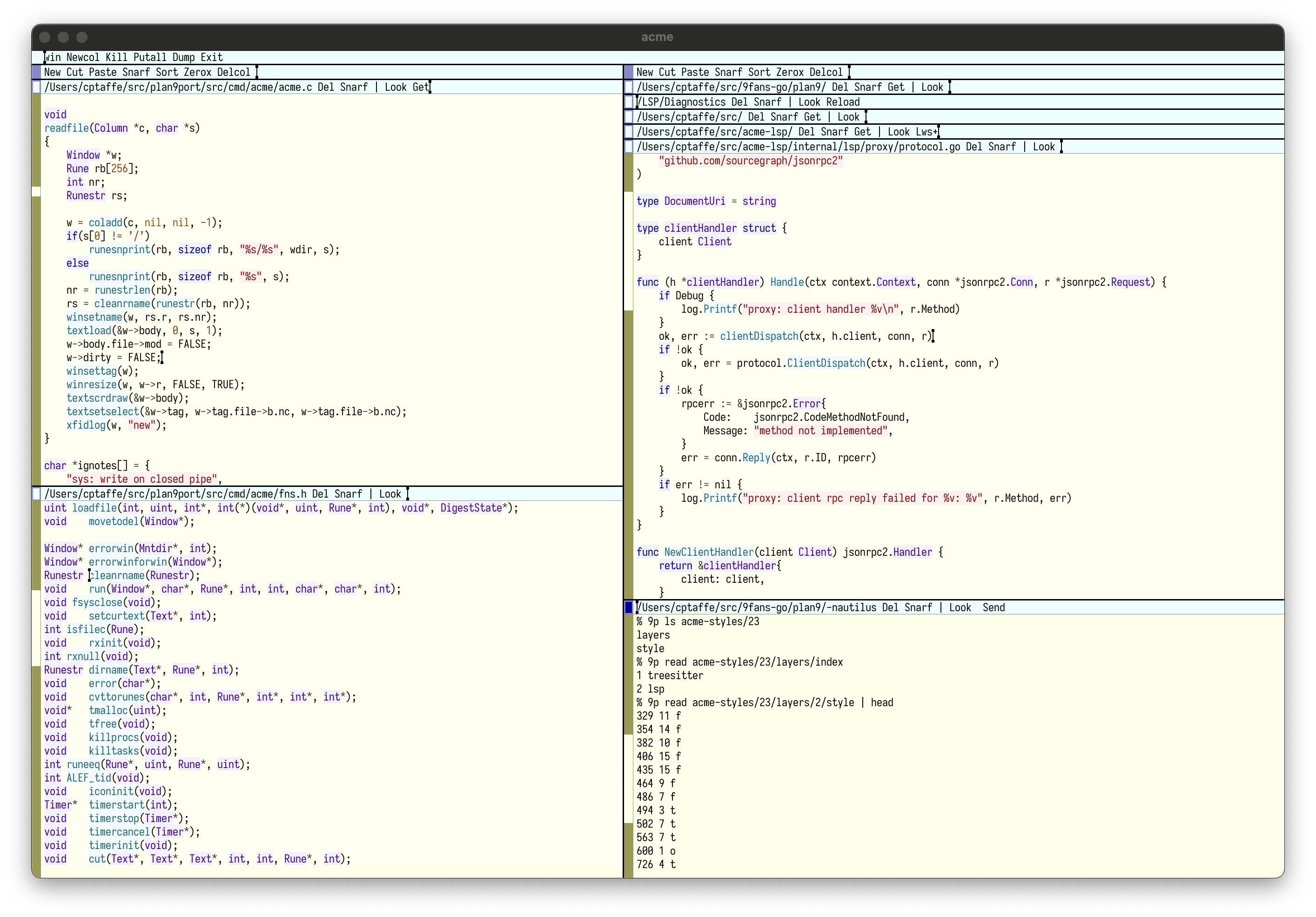
Above is Acme in color for the first time, driven by external programs through the filesystem interface in a way which aligns with Acme's design philosophy. Styling information is provided asynchronously by tree-sitter and the gopls and clangd language servers via acme-treesitter and our fork of acme-lsp, and composited by acme-styles. The 9P interface of Acme provides the live document change feed, optimistic locking mechanism, and sink for styled spans through three new but simple per-window files. Each of these components provides a 9P interface of its own, for instance acme-styles adds the concept of a layer, but otherwise presents the same per-window interface as Acme within each layer, allowing programs to work with or without it. The beauty of Acme in part lies in its careful omission; I have strived to add little to Acme itself, only the minimal interfaces needed to build everything else outside it.
What is Acme?
Acme is Rob Pike's text editor, described in a 1994 USENIX paper1 and included in Plan 9. I use it through plan9port, a port of the Plan 9 userland to UNIX maintained by Russ Cox. His video tour is the best introduction:

Russ Cox uses the phrase "integrating development environment"2 to describe the way Acme integrates command-line tools.3 Select text and middle-click |sort to replace the selection with sorted output (a filter). Middle-click |wc -l to replace it with a line count. Middle-click date with no pipe to insert the output at the cursor (a source). Middle-click mail user@host with selected text to send it (a sink). Middle-click mk to build the project in a new errors window (a side effect). Acme draws no distinction between these — they are all commands executed with the window's directory as context and the selection as input.
The paper calls Acme "a hybrid of window system, shell, and editor."
Acme is in part a file server that exports device-like files that may be manipulated to access and control the contents of its windows.
Each window exposes a directory of 9P files — the body is {w}/body, events
flow through {w}/event. External programs read and write window content
through the filesystem, and the design anticipates multiple external
programs writing to the same window simultaneously:
Any number of agents — the keyboard, mouse, external programs writing to data or body, and so on — may change the contents of a window.
Pike states in the paper that Acme "applies some of the ideas distilled by Oberon."4 The tiled columns, the three-button mouse, and the idea that any visible text can be a command are ideas shared by Wirth and Gutknecht's Oberon system. The difference is the interface: where Oberon uses objects and modules within a programming language, Acme uses files and commands within the Plan 9 operating system.
In Plan 9,5 many services provide a 9P file server,6 and each process has its own namespace — its own view of the filesystem, assembled by binding and mounting.7
Acme posts to /srv/acme (or $NAMESPACE/acme on Unix via plan9port), and
any process that mounts it can read window bodies, write events, and open
new windows through ordinary file operations. Every service described in
this post — the compositor, the hotkey daemon, the session init — is a 9P
server composed the same way.
Pike noted in a 2009 thread that he had always intended for Acme to support more than plain text.8
plan9port9 brings Acme to macOS via devdraw (a Cocoa rendering
backend) and fontsrv (Core Text fonts served as a 9P file server). The
editor itself is unchanged from the 1994 design. What has changed is the
ecosystem around it.
Many people have written about their experience with Acme.1011121314151617181920212223
Namespaces
The power of per-process namespaces goes beyond editors. On Plan 9, $path
is just /bin — you add commands by union-mounting24 directories over
it instead of maintaining a colon-separated search path.
Networking works the same way: interfaces live under /net/ipifc and routes
under /net/iproute. Tailscale's Plan 9 port25 opens
/net/ipifc/clone to create a virtual interface, writes bind pkt to
configure it, and reads and writes raw IP packets through
/net/ipifc/N/data. Because /net is just files, a process can mount an
entirely different /net into its own namespace, transparently rerouting
all its network access. The import command mounts a remote machine's
files into your local namespace, and cpu exports the local namespace to a
remote machine for execution.26 Acme windows on a remote machine
are accessible the same way they are locally.
Pike's concurrent window system in Newsqueak,27 a language
whose channel-based communication model later influenced Go, first
demonstrated how far filesystem composability extends: the window system
multiplexes the mouse, keyboard, and screen for each window by synthesizing
per-window device files — /dev/cons, /dev/mouse, /dev/draw — through
9P. Its successor 8½28 and then rio29 continued this design.
Because each window receives its own /dev, rio can run inside itself.
The cpu command30 uses these same device files to connect a thin
terminal to a remote CPU server. The local machine exports its namespace
via exportfs, and the CPU server mounts it at /mnt/term. The server
then binds from /mnt/term so that /dev/cons, /dev/mouse, and
/dev/draw on the remote machine are actually the local terminal's devices,
served over 9P. Programs executing on the CPU server read the local
keyboard and draw to the local screen without knowing they are remote.
Linux
Plan 9's per-process namespaces were ported to Linux as mount namespaces,
the first of several namespace types that would eventually form the
foundation of Linux containers. Interest in the Plan 9 model has
continued — a 2022 FOSDEM talk31 revisited the cpu command as
an alternative to SSH, arguing that exporting the local namespace to a
remote machine is a more natural model than forwarding individual ports or
tunneling X11.
Alexander Viro's 2001 patch32
described them as "Plan 9 per-process namespaces (sans unions so far)"
with a companion rfork.c, "an equivalent of rfork(RFNAMEG) on Plan 9."
The patch merged into Linux 2.5.2 as CLONE_NEWNS, the first of eight
namespace types.33 Eric Van Hensenbergen's 2005 OLS
paper34 traced the lineage in detail and demonstrated
applications including v9fs (the Linux port of 9P) and plan9port. Eric
Biederman's 2006 OLS paper35 proposed expanding the namespace
model to cover PID, network, and user isolation, writing: "The Plan 9
inspired mount/filesystem namespace has already proved how this can be
done."
A fundamental difference remains in the privilege model. In Plan 9,
rfork(RFNAMEG) is an unprivileged call — any process can copy its
namespace and modify the copy. In Linux, creating a namespace requires
CAP_SYS_ADMIN.36 User namespaces (CLONE_NEWUSER) were introduced to bridge this gap,
allowing unprivileged processes to create namespaces. The tradeoff was
security: Google's kCTF VRP
research
found that 44% of kernel exploits required unprivileged user namespaces as
part of their exploit chain. In 2016, Kees Cook proposed a sysctl to
restrict the feature; Eric Biederman, who created user namespaces, argued
the problems lay in other kernel interfaces being amplified by
namespaces.37 Debian shipped with
kernel.unprivileged_userns_clone=0 until Bullseye (2021), when they
enabled user namespaces by default after concluding that "the risk of
enabling it is outweighed by the security benefits it
provides."38 Ubuntu took a different approach in 23.10,
adding AppArmor-based restrictions that selectively allow or deny
unprivileged user namespaces per application.39
All Linux processes share the root namespace by default; isolation requires
an explicit clone() or unshare() call. Linux namespaces are used
primarily for container isolation (Docker, podman, runc) and application
sandboxing (Flatpak, bubblewrap). In Plan 9, each process inherits a copy
of its parent's namespace at rfork and can bind or mount freely within it.
There is no bind(1) in the Linux shell, and Linux's VFS is an internal
kernel abstraction; Plan 9's 9P is an IPC protocol that any program can
speak. Linux also restricts unprivileged mounting to filesystems explicitly
flagged FS_USERNS_MOUNT, such as FUSE. v9fs,40 the Linux port of 9P
contributed to by Eric Van Hensbergen and Russ Cox among
others,41 does not yet carry this flag — an unprivileged user
cannot mount a 9P service into their namespace without root or a user
namespace.
rc
Plan 9's shell is rc,42 designed by Tom Duff at Bell Labs as a replacement for the Bourne shell.
Rc draws heavily from Steve Bourne's /bin/sh. Any successor of the Bourne shell is bound to suffer in comparison. I have tried to fix its best-acknowledged shortcomings and to simplify things wherever possible, usually by omitting inessential features. Only when irresistibly tempted have I introduced novel ideas.
The most important principle in rc's design is that it's not a macro processor. Input is never scanned more than once by the lexical and syntactic analysis code (except, of course, by the eval command, whose raison d'être is to break the rule).
Bourne shell re-scans variable values when they are substituted into a
command. Every $x expands to a string that is then word-split on IFS —
so a variable containing hello world becomes two arguments, and a filename
with a space breaks silently. The fix is to quote every variable as "$x",
a convention so universal it is almost invisible, and so easy to forget that
it remains a persistent source of bugs. In rc, variables are lists: $x
expands to a list item directly, without re-splitting. There is nothing to
quote.
plumber
The plumber is Plan 9's inter-application dispatch layer.43 Right-clicking text in any Acme window sends it through a rules file. The rules pattern-match against the text and context — filename, working directory — and decide what to do: open a file in Acme, send a URL to the browser, run a command.
Pike described the plumber in "Plumbing and Other Utilities":
The result is similar to a hypertext system in which all the links are implicit, extracted automatically by examining the data and the user's actions.
Right-clicking a filename opens it. Right-clicking a URL opens the browser. Right-clicking a compiler error opens the source file at the right line. Nothing is explicitly linked; the plumber infers the action from the data.
The plan9port default rules handle the common cases. I've added several
custom rules in ~/lib/plumbing. The first line of the file is a comment
that doubles as a reload command:
# Edit ,>9p write plumb/rules
Middle-clicking that line in Acme selects the entire file body (,), pipes
it through 9p write plumb/rules, and the plumber is updated live.44
Go and Python stack traces already contain file paths —
/usr/local/go/src/fmt/print.go:1234 — so the default rules handle them.
JVM stack traces are different: at com.example.Foo.bar(Foo.java:42) is a
class member reference, not a file path. The plumber cannot resolve it
without knowing where the source lives. Lframe enables plumbing for
these — an rc script that sends the frame to the language server via
acme-lsp's 9P interface and plumbs the result:
# jdtls: java.project.resolveStackTraceLocation
printf '%s' $frame \
| jq -Rsc '{..., "params": {"command": "java.project.resolveStackTraceLocation", "arguments": [.]}}' \
| 9p rdwr acme-lsp/$server \
| jq -r '.result | sub("^file:(//)?/?"; "/")'
For Scala, I extended metals
with resolve-stacktrace-location so the same right-click that opens a Go
source file works on a JVM stack trace:
type    is      text
data    matches '([a-zA-Z0-9_\.]+\.[A-Z0-9\$_][A-Za-z0-9\$_]*\.[a-z\$][A-Za-z0-9\$_]*\([A-Z0-9\$_][A-Za-z0-9\$_]*\.java:([0-9]+)\))'
plumb   start   Lframe $1 $2
I also have rules for git commits, JIRA tickets, and GitHub PRs.
Right-clicking a commit hash like commit a1b2c3d4 runs git show and
plumbs the output into an Acme window. Right-clicking a ticket key like
PROJ-1234 opens a Ticket window that fetches the issue from JIRA,
formats it as markdown, and handles Get to refresh:
type    is  text
data    matches '[A-Z][A-Z]+-[0-9]+'
plumb   start rc -c 'Ticket '$0
Ticket and PR are simple Acme applications written in rc, using
plan9port's acme.rc library to create a window and run an event loop. The body function fetches the ticket,
formats it to the window width, and writes it to the body through the
filesystem interface:
#!/usr/bin/env rc
. $PLAN9/lib/acme.rc

key=$1

fn body {
    ctl=`{winread ctl}
    pixels=$ctl(6)
    tabpx=$ctl(8)
    cols=`{echo $pixels $tabpx $ts | awk '{printf "%d\n", $1 / ($2 / $3)}'}

    echo -n '0,$' | winwrite addr
    jira read $key | mdnorm | mdfmt -w $cols | winwrite data
    winctl clean
}

fn event {
    switch($1$2){
    case Mx MX
        switch ($9) {
        case Get
            body &
        case Del
            windel sure
        case *
            winwriteevent $*
        }
    case Ml ML
        winwriteevent $*
    }
}

newwindow
winname $home'/+jira/'$key
echo -n 'Get' | winwrite tag
body &
wineventloop
jira read fetches the issue from the Jira REST API and converts the
Atlassian Document Format body to markdown, including status, links,
children, and comments. mdnorm normalizes the markdown and
mdfmt word-wraps it to the window's
column width. Right-clicking
org/repo#123 opens a similar PR window with the description, review
comments, and diff fetched from gh.
win
The win command opens a shell inside an Acme window. The scrollback buffer
is the window body — editable, searchable, plumbable. As Russ Cox
recounts in the video tour, you can leave yourself notes in your
debugger output, delete mistyped commands or noisy output, and edit a
command in place before re-running it with a middle-click — a more elegant
form of up-arrow and edit in a standard terminal. You can right-click a path
in compiler output and the plumber opens the file. You can select text in
the output, middle-click |sort, and the selection is replaced with the
sorted result. The scrollback responds to the same mouse chords as any other
Acme window.
win sets TERM=dumb, so commands that emit escape sequences need to be
tamed. In ~/lib/profile (rc's equivalent of .profile) I set:
NO_COLOR=1
PAGER=p
EDITOR=E
GIT_QUIET=1
BUILDKIT_PROGRESS=plain
MAVEN_ARGS='--batch-mode -Dorg.slf4j.simpleLogger.defaultLogLevel=warn'
NO_COLOR45 disables color output in tools that respect the
convention. p is a plan9port pager that works without terminal control
sequences. E opens files in Acme. GIT_QUIET suppresses the progress
bars that produce streams of \r in win. The Maven and Docker flags do
the same for their respective build output.
Syntax Highlighting
Syntax highlighting is a contentious subject in the Acme community. In 2008, someone on the 9fans mailing list posted a list of nineteen feature requests for Acme.46 Russ Cox responded to each with the "Acme way" of working:
- Line numbers? Use
:nto jump,Edit =to find the current line. - Rulers? "The Acme way is not to care what column you're on."
- Search and replace?
Edit .+#0/old/c/new/in the tag — middle-click through replacements, undo the ones you don't want. - Bookmarks? A file listing paths and line numbers.
- Code folding? Conflicts with Acme's core design that window contents are ordinary text streams.
- Syntax highlighting? "Just say no."
A former classmate recounted his reply when asked why he didn't use syntax highlighting himself: "Do you color code all your English by part of speech?"47
There is something to this. Nikita Tonsky's essay on syntax highlighting48 makes the point well — most color themes assign unique bright colors to everything, the eye adapts, and the highlighting loses its informational value. His prescription is so few colors that you can hold the entire scheme in memory.
Two years earlier, in a 2006 Inferno mailing list thread, Cox noted:49
However, syntax highlighting is undeniably useful for distinguishing three different classes of text that can easily be confused for each other: regular program, comments, and string literals.
He went on to note that Acme and libframe were not structured to handle different colors for individual pieces of text, but:
It would be nice in some contexts if acme could assign fonts and perhaps colors to the text it displays... And yes, you might even do something like syntax highlighting, again as a separate acme client program.
I use colors to distinguish the few semantic classes that matter: keywords,
types, strings, and comments. The palette names each class a highlighter can
report — keyword, string, comment, and so on. You choose which ones to
use by which colors you assign them. Comment most of them out and only the classes you care about become visible.
The Design
I added three files to each Acme window in my plan9port fork (cptaffe/plan9port), instead of building syntax highlighting into the editor:
| File | Description |
|---|---|
{w}/style |
Accepts styled spans — a palette of named colors (:name fg=#rrggbb bg=#rrggbb) followed by a run list of rune-offset ranges (start len name).50 Writing to {w}/style changes how Acme paints the window. |
{w}/log |
Streams body edit events to any number of concurrent readers without write-backs. Each entry follows the event file format: I 42 47 0 5 hello\n (op, q0, q1, flag, nr, text). Before {w}/log, acme-lsp tracked edits by polling {w}/body on a timer. |
{w}/seq |
A counter that increments with every body edit. A client reads the seq, processes log entries (updating its seq for each), and writes its seq to {w}/seq before opening {w}/style. Like writing {w}/addr scopes a write to {w}/data, writing {w}/seq fails the following write to {w}/style if an edit has occurred since — the client can never write stale spans. |
These three files alone are enough to implement a simple highlighter as a
shell script. This one watches acme/log for .foo files and highlights
comments (#) and strings ("...") using rc and awk:
#!/usr/bin/env rc

fn highlight {
	id=$1
	{
		echo ':comment fg=#336633'
		echo ':string fg=#880000'
		9p read acme/$id/body | awk '
		BEGIN { pos = 0 }
		{
			n = length($0); i = 1
			while (i <= n) {
				c = substr($0, i, 1)
				if (c == "#") {
					printf "%d %d comment\n", pos + i - 1, n - i + 1; break
				}
				if (c == "\"") {
					j = i + 1
					while (j <= n && substr($0, j, 1) != "\"") j++
					if (j <= n) j++
					printf "%d %d string\n", pos + i - 1, j - i
					i = j; continue
				}
				i++
			}
			pos += n + 1
		}'
	} | 9p write acme/$id/style
}

9p read acme/log | awk '{print $1, $2, $3}' | while(id op name = `{read}) {
	if(~ $op new put && echo $name | grep -qs '\.foo$')
		highlight $id &
}
The script reads the window body, walks each line character by character to
find # comments and "..." strings, emits rune-offset runs, and writes
the palette and runs to {w}/style in one pipe. This is roughly what Cox
described in 2006 — a few regular expressions in a separate client program.
acme-styles
Multiple tools need to write {w}/style simultaneously. Acme's
{w}/event file enforces a single consumer through a write-back pipeline,
but {w}/style has no such mechanism. If tree-sitter, the language server,
and the Highlight tool each wrote directly, the last write would overwrite
the others.
acme-styles is a 9P file server
that sits between highlighting tools and Acme. It uses the watch windows
library from our 9fans-go fork
(cptaffe/9fans-go, forked from
9fans/go) to track window lifecycles. Each
tool writes spans to a named layer. The compositor merges all layers by
priority order and writes the result to {w}/style.
acme-styles/
  20/
    layers/
      new        write to allocate a new layer; returns the layer name
      index      read to list active layers
      treesitter/
        style    write highlight spans
        ctl      write "del" to remove this layer
        seq      read current body seq
    style        read the composed output
Layer priority comes from the master palette file (~/lib/acme/styles):
@ highlight
@ *
@ lsp
@ treesitter
@ lines define stacking order. * catches unlisted layers. A manual
highlight (yellow) always wins; LSP semantic colors override treesitter syntax
colors where they overlap; treesitter fills the rest.
Palette entries define named colors:
:base      fg=#000000 bg=#FFFFF0
:comment   fg=#336633 bg=#F0FFF0
:keyword   fg=#00007F bg=#F0F0FF
:string    fg=#880000 bg=#FFF0F0
:type      fg=#440088 bg=#F5F0FF
:highlight fg=#000000 bg=#FFFF00
The names are the same ones acme-treesitter, acme-lsp, and Highlight emit, so
a tool needs no table of its own to know what a run means.
The composition algorithm is a sweep line. Each layer's runs are expanded
into start/end events, sorted by position with ends before starts. A map
tracks which style is active at each layer. At each position, the
highest-priority active style wins completely — no attribute merging. When a
high-priority span ends, the next layer down takes over immediately. The
compositor diffs the result against the previous output and writes only the
changed region to {w}/style.
The wire format is the feature2 protocol I added to plan9port. Palette
definitions are :name lines with an optional foreground and background
(fg=#rrggbb, bg=#rrggbb). Run entries are start len name — rune offset, rune length, palette name. A composed output for a
small file might look like:
:base fg=#000000 bg=#FFFFF0
:keyword fg=#00007F bg=#F0F0FF
:string fg=#880000 bg=#FFF0F0
:comment fg=#336633 bg=#F0FFF0
0 7 keyword
8 14 string
30 42 comment
Gaps between runs default to :base.
Tree-sitter
Tree-sitter is a parser generator and incremental parsing library. It builds concrete syntax trees from source files and updates them efficiently as text changes. After an edit, tree-sitter re-parses only the affected region and propagates the change upward through the tree.
Grammars are written in a small DSL and compiled to C. They define which node
types produce named captures: @keyword, @comment, @type.builtin, etc.
acme-treesitter maps these capture names to palette entries via a lookup
table:
keyword   keyword
comment   comment
string    string
type      type
operator  punctuation
operator  string.escape
heading1  markup.heading.1
The lookup is hierarchical: @function.method tries function.method first,
then falls back to function. This keeps the mapping small — one entry covers
all dot-separated variants of a capture group.
acme-treesitter watches
{w}/log for window open and body-change events. When the body changes, it
schedules a re-parse — debounced,
so a burst of keystrokes triggers one parse at the end, not one per character.
The parse and span write are asynchronous; the editor is never waiting on the
highlighter.
Language injection handles composite files: fenced code blocks in Markdown are parsed by the inner language's grammar; Go inside yacc grammar files; each injection is an independent parse.
Semantic Highlighting
acme-lsp (forked from 9fans/acme-lsp) connects Acme windows to language servers — gopls for Go, clangd for C and C++, and others via the standard LSP protocol.(LSP spec)
The fork adds semantic token support. Language servers produce type information
that goes beyond syntax: gopls distinguishes a type parameter from a local
variable; clangd marks namespace qualifiers differently from type names. These
come from the LSP textDocument/semanticTokens/full/delta endpoint, which
sends changes from the previous state rather than a full token list each time.
The resulting spans land in the "lsp" layer, above treesitter in priority.
The fork also watches the per-window edit log and refreshes incrementally as
you type. Semantic colors update without requiring a save. Put on a Go file
triggers source.organizeImports + format. The L command handles
navigation: L def, L refs, L hov, L rn, L fmt.
The configuration lives in ~/lib/acme-lsp/config.toml. The Go setup is
straightforward:
[Servers.gopls]
Command = ["gopls", "serve"]

[Servers.gopls.Options]
hoverKind = "FullDocumentation"
The JVM servers are harder. jdtls requires Java 21 to run but your project
may target 17, and it needs a lombok agent injected. metals needs a specific
classpath constructed by coursier from a publishLocal build. Each gets a
wrapper script in ~/lib/acme-lsp/:
#!/usr/bin/env rc
# ~/lib/acme-lsp/jdtls
JAVA_TOOL_OPTIONS='-Xmx4g -Xms1g -Xss8m -javaagent:'$home'/lib/acme-lsp/lombok.jar'
JAVA_VERSION=21
JAVA_HOME=`{/usr/libexec/java_home}
path=($JAVA_HOME/bin $path)
jdtls $*
#!/usr/bin/env rc
# ~/lib/acme-lsp/metals
JAVA_TOOL_OPTIONS='-XX:+UseStringDeduplication -Xss4m -Xms100m'
JAVA_VERSION=17
JAVA_HOME=`{/usr/libexec/java_home}
path=($JAVA_HOME/bin $home'/Library/Application Support/Coursier/bin' $path)
CLASSPATH=`{cs fetch --classpath org.scalameta:metals_2.13:1.6.2}
java scala.meta.metals.Main $*
The wrappers isolate each server's Java version and classpath from the rest of the environment. The config maps file extensions to servers:
[[FilenameHandlers]]
Pattern = "\\.go$"
LanguageID = "go"
ServerKey = "gopls"

[[FilenameHandlers]]
Pattern = "\\.java$"
LanguageID = "java"
ServerKey = "jdtls"

[[FilenameHandlers]]
Pattern = "\\.scala$"
LanguageID = "scala"
ServerKey = "metals"
I also run ccls for C/C++ and pyright for Python.
The Seq Guard
Highlighting requires reading the body, running a parse or LSP round-trip,
and writing spans back. If the user edits during the round-trip, the old
spans describe stale rune positions. Each tool tracks its seq as it
processes log entries. Before writing spans, it writes its seq to
{w}/seq, then opens {w}/style. If the body has been edited since that
seq, the write to {w}/style fails and the tool retries after processing
any outstanding log entries.
Persistent Highlights
Tree-sitter and LSP highlights disappear when you run Get (Acme's reload
command). The highlights are keyed to rune offsets; after a reload the body is
new and the offsets are wrong.
acme-highlight solves this with an anchor model adapted from
the W3C Text Fragment URL specification (W3C Text Fragment spec) Instead of a rune
offset, an anchor stores the highlighted text plus surrounding context —
prefix and suffix. After Get, the anchor re-resolves: it searches the new
body for prefix+text+suffix. If the full context matches uniquely, done. If
not, it alternates trimming one character from the longer side — prefix
first when they are equal — until it either finds a unique match or exhausts
the context entirely. An anchor that cannot resolve remains orphaned until
the text reappears.
During editing (before Get), anchors track position by consuming the
per-window edit log and adjusting offsets incrementally. After Get, which
resets offsets, re-resolution takes over.
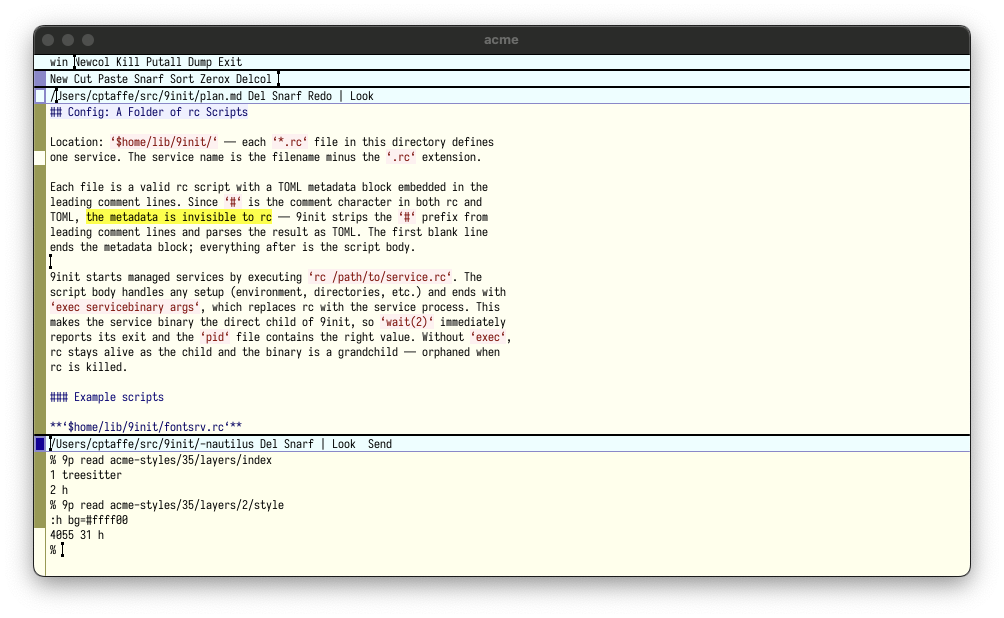
The Highlight command (bound to ⌘⇧H) toggles a yellow anchor over the
current selection. The "highlight" layer sits at the top of the priority
stack. I use it primarily to mark pieces of prose I want to return to — a
sentence in a markdown file that needs rewording, a paragraph that needs a
citation. The highlights survive Get, so they are still there when I come
back to the file. Unresolved anchors — text that has been deleted — are
retained and reappear if the text comes back.
Hotkeys
I could not live without the keyboard shortcuts I had built muscle memory for over years in TextMate, Sublime, Atom, VS Code, and IntelliJ. Especially ⌘S to save and ⌘B to go to definition. Acme on macOS has only a handful of built-in shortcuts — cut, copy, paste, undo — and deliberately no more. The keyboard-centric shortcut model is exactly what Acme is trying to move away from. But ⌘S is not optional for me.
acme-hotkey handles keyboard shortcuts at the macOS session layer
via a CGEventTap.51 The tap intercepts keystrokes before they
reach any application. Key names are derived from the active keyboard layout
via UCKeyTranslate, so the same physical key always produces the same logical
name regardless of input method state.
The service exposes a 9P filesystem for session management:
acme-hotkey/
  new         read to allocate a session; returns the session name
  <session>/
    filter    write process names to subscribe
    keys      read to receive keystroke events (blocking)
    ctl       write "del" to release the session
hotkeys.straw reads from the keys file, pattern-matches events, and
dispatches to Acme by writing to acme/$winid/ctl.52 The current window
ID comes from acme-focused.
straw
AWK's design, using Aho's patterns and actions as in yacc, is elegant —
it's a tool I often reach for when writing scripts. After using Plan 9's
shell rc and the Sam editor language in Acme, AWK feels left behind. It's
still line-oriented, and it doesn't support capture groups as Sam does. Pike wrote
Structural Regular Expressions53
about how AWK could be evolved to incorporate these advancements, but never
implemented those changes. The
straw project (structural AWK) is my
attempt at the implementation.
Where AWK fires once per line that contains a match, straw fires once per
match in the stream — $0 is exactly what matched, not the enclosing line.
A bare block { } is shorthand for /[^\n]*\n/, which scans line by line
with $0 set to the line without its newline — so straw can do everything
AWK does, but the default unit of work is a match, not a line. Rules are
tried in order at the current position; first match consumes its bytes and
advances. Nested /re/ { } inside a block iterates over all non-overlapping
matches within $0. Named capture groups ((?P<name>…)) populate $name.
All rules are compiled into a single Thompson NFA.54 An alt-chain
at the front seeds all rule start states into the thread list simultaneously.
The executor steps every active thread in parallel through the input. When
multiple rules match at the same position,
leftmost-first priority gives "first rule wins" for free. Each rule's
InstMatch is tagged with its index so the executor can report which rule
fired.
The NFA for the example above, generated by straw -dump | nfa2dot.py:
A small example — two rules with a named capture and a bare-block fallback:
$ printf 'command s\ncommand shift b\ncommand t\na\n' | straw '
/command shift (?P<key>\w+)\n/ { printf "⌘⇧%s\n", $key }
/command (?P<key>\w+)\n/       { printf "⌘%s\n", $key }
{ printf "forward: %s\n", $0 }
'
⌘s
⌘⇧b
⌘t
forward: a
The shift rule comes first, so command shift b matches it before the
plain command rule can. a matches neither pattern and falls through to
the bare block. Named captures populate $key.
The hotkeys.straw pipeline reads keystroke events from acme-hotkey and
dispatches commands. A snippet:
/command s\n/          { run("Put");       printf "!%s", $0 }
/command shift s\n/    { run("Putall");    printf "!%s", $0 }
/command b\n/          { run("Ldef");      printf "!%s", $0 }
/command shift b\n/    { run("Lrefs");     printf "!%s", $0 }
/command shift h\n/    { run("Highlight"); printf "!%s", $0 }
/command t\n/          { run("win");       printf "!%s", $0 }
/command p\n/          { run("Search");    printf "!%s", $0 }

# forward unmatched events back to the application
{ print $0 }
printf "!%s", $0 writes back the event with a ! prefix, telling
acme-hotkey to consume it. The bare block at the end forwards anything
unmatched.
Because straw patterns can span multiple lines, key chords fall out
naturally. An emacs-style C-x C-s sequence is two events on two lines —
straw matches them as one pattern:
/control x\ncontrol s\n/ { run("Put"); printf "!%s", $0 }
/control x\ncontrol f\n/ { run("Open"); printf "!%s", $0 }
The NFA holds state between keystrokes — after control x\n, all chord
rules remain active until the next event resolves which one matched.
Combined with a language like Racket for the action bodies, straw could
serve as a general keybinding engine with programmable dispatch.
acme-focused watches acme/log for focus events and exposes
the current focused window ID as a readable file at
$NAMESPACE/acme-focused/focus. Without it, hotkeys.straw has no way to
target the right window when a shortcut fires.
Session Init
All these services need to start in the right order and stop when Acme exits.
I originally used launchd agents with PathState dependencies. They were
unreliable: launchd's readiness detection is poll-based, so a service that
crashed and recovered within the polling window left its dependents holding
stale connections, requiring a manual launchctl kickstart.
9init is a session init system written
in the spirit of Plan 9's startup conventions. Services are rc scripts in
~/lib/9init/*.rc with TOML frontmatter in comment lines — adding a service
is creating a file, removing one is deleting it, and the scripts are directly
executable with rc for debugging. Readiness is a socket: when
$NAMESPACE/name appears, the service is ready. No health checks, no HTTP
probes. EVFILT_VNODE NOTE_WRITE on the namespace directory fires the
moment a socket appears or disappears, so there is no polling.
9init watches for Acme. When $NAMESPACE/acme
appears (I ran the a script), dependents start. When it disappears,
dependents stop in reverse topological order.
The frontmatter for acme-styles.rc:
#!/usr/bin/env rc
# socket  = "acme-styles"
# after   = ["acme"]
# restart = "on-failure"

exec acme-styles -styles $home/lib/acme/styles
9init exposes a 9P filesystem for observability:
init/
  ctl        write "stop <name>" or "restart <name>"
  status     read: one line per service with state and PID
  svc/
    acme-lsp/
      log    streaming log output (blocking read)
9p read init/svc/acme-lsp/log tails the LSP log in real time.
Every 9P service I wrote for this stack sits on p9srv (github.com/cptaffe/p9srv),
our library for posting plan9port namespace services. Post(name) creates
a socketpair, forks 9pserve unix!$NAMESPACE/name, blocks until the socket
appears, and returns the pipe end. The three-layer stack:
Inside plan9port
As Russ noted twenty years ago, the highlighting work required changes to both Acme and libframe.
In Acme, I added {w}/style, {w}/log, and {w}/seq along with parsing
code in style.c and the per-window edit log in logf.c. The style parser
handles both full replacement and partial updates: writing to {w}/style
after setting {w}/addr replaces only the runs in the addressed range,
leaving the rest intact. I also stripped out my keytab hack so that all
keyboard shortcuts are handled externally by acme-hotkey.
Acme stores styled spans in each window as a palette and a sorted array of runs:
struct WinStyleEntry {
    char  *name;       /* "base" for index 0 */
    ulong  fg, bg;     /* RGBA (0xRRGGBBFF), or Nocolor if unset */
};

struct WinStyleRun {
    ulong start;       /* file-absolute rune offset */
    ulong len;         /* rune count */
    int   paletteidx;  /* index into Window.wpalette */
};
Runs are file-absolute, non-overlapping; gaps implicitly use palette index
0 (base).
libframe is the library that renders text into a rectangular region of the
screen. It breaks text into a flat array of boxes — each box is a
contiguous run of runes that can be measured and drawn in one call, or a
break character (newline, tab). The Frame structure holds the box array, the
selection range (p0, p1), and the font and colour images. Drawing
proceeds by walking boxes left to right, advancing a pixel cursor.
To support styling, I added a run-length encoding to the Frame:
struct Frame {
    /* ... existing fields ... */
    int    nstylecols;  /* palette size (0 = unstyled) */
    Image **stylecols;  /* nstylecols * NCOL image pointers */
    int    nstyles;     /* number of RLE segments */
    ulong *styles;      /* {style_index, length, ...} */
};
The styles array is a parallel structure to the boxes: it encodes which
palette entry applies to each rune position, compressed as (index, length)
pairs. frstyleinsert and frstyledelete keep this array in sync with
text edits by splitting and shifting runs.
The drawing function drawrange_impl walks boxes and style segments in
lockstep. At each step it computes the next sub-span bounded by the box
edge, the style segment edge, and the selection boundary, draws it with the
correct colours, and advances both cursors. Each box and segment is visited
exactly once — O(n+m) where n is the number of boxes and m the number of
style segments in the visible range.
Usage
9init starts at login, starts fontsrv and plumber, then watches for
$NAMESPACE/acme. When I run a, Acme posts its socket and 9init's
kqueue watcher fires. acme-styles, acme-hotkey, and acme-focused start
concurrently. Once acme-styles posts its own socket, acme-lsp and
acme-treesitter start. The whole stack is running within a second of
opening the editor.
When I open a .go file, acme-treesitter parses it with tree-sitter and
writes syntax spans to the compositor. acme-lsp sends the body to gopls and
writes semantic tokens to a higher-priority layer. acme-styles composes
both layers and writes the result to {w}/style. Acme repaints. When I
press ⌘S, acme-hotkey writes put to Acme, acme-lsp runs
source.organizeImports and formats, and acme-treesitter sees the body
change in {w}/log and re-parses. ⌘B opens the definition for the symbol under the cursor in a new window. When I highlight a phrase and press ⌘⇧H, acme-highlight
stores the text with its surrounding context. After a Get, the anchor
re-resolves at the new position.
LSP diagnostics could be surfaced the same way: language servers already
push error ranges with textDocument/publishDiagnostics on every edit,
and acme-lsp could write those spans to a "diagnostics" layer — syntax
errors painted inline with a red background, warnings in yellow.
The infrastructure described here — compositor, seq guards, anchor model, session init, socket lifecycle library — is roughly fifteen thousand lines of Go and C that didn't exist two years ago. The editor itself is thirty-two years old and substantially unchanged.
Rob Pike, in "Systems Software Research is Irrelevant":26
Narrowness of experience leads to narrowness of imagination.
In the lower-right win window of the opening screenshot, 9p read acme-styles/20/style | head prints the composed style stream that acme
reads to color window 20. The left column shows acme.c, highlighted by
the same pipeline it hosts. The editor is reading its own compositor output.
-
Rob Pike, Acme: A User Interface for Programmers, USENIX Winter 1994. ↩︎
-
Russ Cox, A Tour of Acme, video, 2012. Cox coins "integrating development environment" here — an integrating environment that draws Unix tools in, as opposed to an integrated one that replaces them. ↩︎
-
Dennis Ritchie and Ken Thompson's The UNIX Time-Sharing System outline filters in section 6.2, introducing pipes:
↩︎An extension of the standard I/O notion is used to direct output from one command to the input of another. A sequence of commands separated by vertical bars causes the Shell to execute all the commands simultaneously and to arrange that the standard output of each command be delivered to the standard input of the next command in the sequence.
-
Niklaus Wirth and Jürg Gutknecht, Project Oberon: The Design of an Operating System, a Compiler, and a Computer. Pike's immediate predecessor to acme was Help, "an experimental system written a few years ago as a first try at exploring some of Oberon's ideas in an existing operating system." ↩︎
-
Rob Pike, Dave Presotto, Sean Dorward, Bob Flandrena, Ken Thompson, Howard Trickey, and Phil Winterbottom, Plan 9 from Bell Labs, Computing Systems, 1995. ↩︎
-
Rob Pike et al., The Use of Name Spaces in Plan 9. ↩︎
-
Rob Pike, reply to "Why does Acme only show text?," comp.os.plan9, July 2009. ↩︎
-
Russ Cox, Plan 9 from User Space. ↩︎
-
Daniel Moch, Acme: The Un-Terminal, January 2025. ↩︎
-
Mathieu Bivert, On Plan9's Acme. ↩︎
-
Alex Karle, Exploring Acme, Plan 9, and NO_COLOR. ↩︎
-
Satyajit Ranjeev, Bitter Sweet Acme. ↩︎
-
jcs, Using Acme, Irreal. ↩︎
-
David Yates, Text editors II: Acme, 2015. ↩︎
-
Acme as an editor, JLOUIS Ramblings, 2013. ↩︎
-
Peter Mikkelsen, How I Started Using Acme. ↩︎
-
Ruben Berenguel, Editor Magic: emacs, vim, acme and the return key, 2012. ↩︎
-
Ruben Berenguel, Extensibility in the Acme Text Editor, 2013. ↩︎
-
Differences from Acme, Anvil editor. ↩︎
-
evbogdanov/acme, a community-maintained collection of scripts and tools. ↩︎
-
Ask HN: Does anyone use Acme editor?, Hacker News, 2020. ↩︎
-
Brad Fitzpatrick, Tailscale on Plan 9 from Bell Labs, April 2025. ↩︎
-
Rob Pike, Systems Software Research is Irrelevant, Utah, 2000. Pike describes the
cpucommand: "From the local terminal, you get a shell window on the remote cpu server, but all the local resources — the file system, the network, even the devices — are still available." ↩︎ ↩︎ -
Rob Pike, A Concurrent Window System. See also The Implementation of Newsqueak, Software—Practice and Experience, 1990. ↩︎
-
Rob Pike, 8½, the Plan 9 Window System. ↩︎
-
Rob Pike, The Rio Window System. ↩︎
-
The Plan 9 cpu command, FOSDEM 2022. ↩︎
-
Al Viro, per-process namespaces for Linux, LKML, February 2001. ↩︎
-
Mount (2002), UTS (2006), IPC (2006), PID (2008), network (2008-2009), user (2007-2013), cgroup (2016), and time (2020). See namespaces(7). ↩︎
-
Eric Van Hensenbergen, Glen or Glenda: Empowering Users and Applications with Private Namespaces, OLS 2005. ↩︎
-
Eric Biederman, Multiple Instances of the Global Linux Namespaces, OLS 2006. ↩︎
-
unshare(2) — "allows a process to disassociate parts of its execution context that are currently being shared with other processes." ↩︎
-
Jonathan Corbet, Controlling access to user namespaces, LWN, January 2016. ↩︎
-
Eric Van Hensbergen and Ron Minnich, Grave Robbers from Outer Space: Using 9P2000 Under Linux, FREENIX Track, USENIX 2005. ↩︎
-
v9fs: Plan 9 Resource Sharing for Linux, Linux kernel documentation. Contributors include Ron Minnich, Maya Gokhale, Eric Van Hensbergen, Latchesar Ionkov, and Russ Cox. ↩︎
-
Tom Duff, Rc — The Plan 9 Shell, Bell Labs. ↩︎
-
Rob Pike, Plumbing and Other Utilities. ↩︎
-
Acme's
Editcommand takes sam's command language, where,addresses the whole file and>sends it to a command's standard input. Rob Pike, A Tutorial for the Sam Command Language. ↩︎ -
no-color.org — a convention for disabling color output. ↩︎
-
Russ Cox, reply to "Using the Acme Editor," 9fans, August 2008. Full thread. ↩︎
-
Hacker News, comment by bravura, March 2022. ↩︎
-
Nikita Tonsky, I am sorry, but everyone is getting syntax highlighting wrong. ↩︎
-
Russ Cox, reply in "Syntax highlighting in Acme?," Inferno mailing list, February 2006. ↩︎
-
Rune offsets because Acme is internally rune-oriented and source files routinely contain non-ASCII text. ↩︎
-
CGEventTap — macOS Quartz Event Services. Requires Accessibility permission. ↩︎
-
The
ctlfile accepts lowercase commands:put,get,del,delete. The capitalized forms (Put, Del) are the tag-level names that acme recognizes when middle-clicked as commands. ↩︎ -
Rob Pike, Structural Regular Expressions, 1987. ↩︎
-
Ken Thompson, Regular Expression Search Algorithm, Communications of the ACM, 1968. Russ Cox's Implementing Regular Expressions series walks through the Thompson construction and its advantages over backtracking engines. ↩︎